Once upon a time in Europe, television remote controls had a magic teletext button. Years before the internet stole into homes, pressing that button brought up teletext digital information services with hundreds of constantly updated pages. Living in Ireland in the 1980s and ’90s, my family accessed the national teletext service—Aertel—multiple times a day for weather and news bulletins, as well as things like TV program guides and updates on airport flight arrivals.
It was an elegant system: fast, low bandwidth, unaffected by user load, and delivering readable text even on analog television screens. So when I recently saw it was the 40th anniversary of Aertel’s test transmissions, it reactivated a thought that had been rolling around in my head for years. Could I make a ham-radio version of teletext?
What is Teletext?
First developed in the United Kingdom and rolled out to the public by the BBC under the name Ceefax, teletext exploited a quirk of analog television signals. These signals transmitted video frames as lines of luminosity and color, plus some additional blank lines that weren’t displayed. Teletext piggybacked a digital signal onto these spares, transmitting a carousel of pages over time. Using their remotes, viewers typed in the three-digit code of the page they wanted. Generally within a few seconds, the carousel would cycle around and display the desired page.
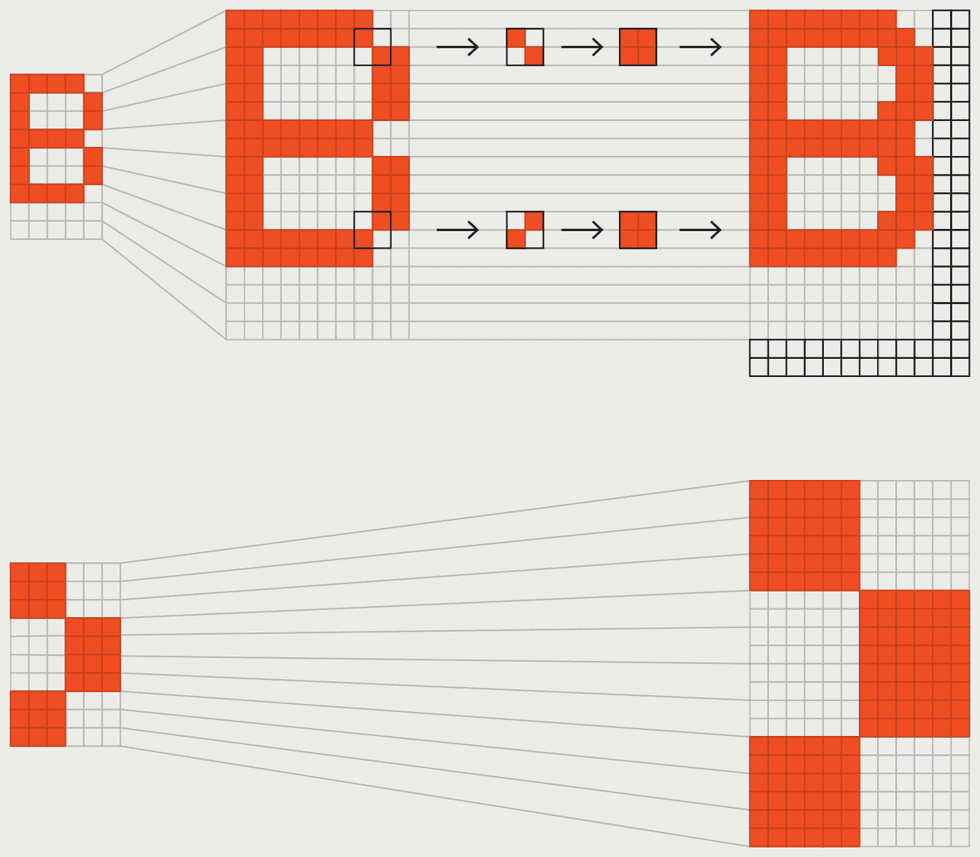

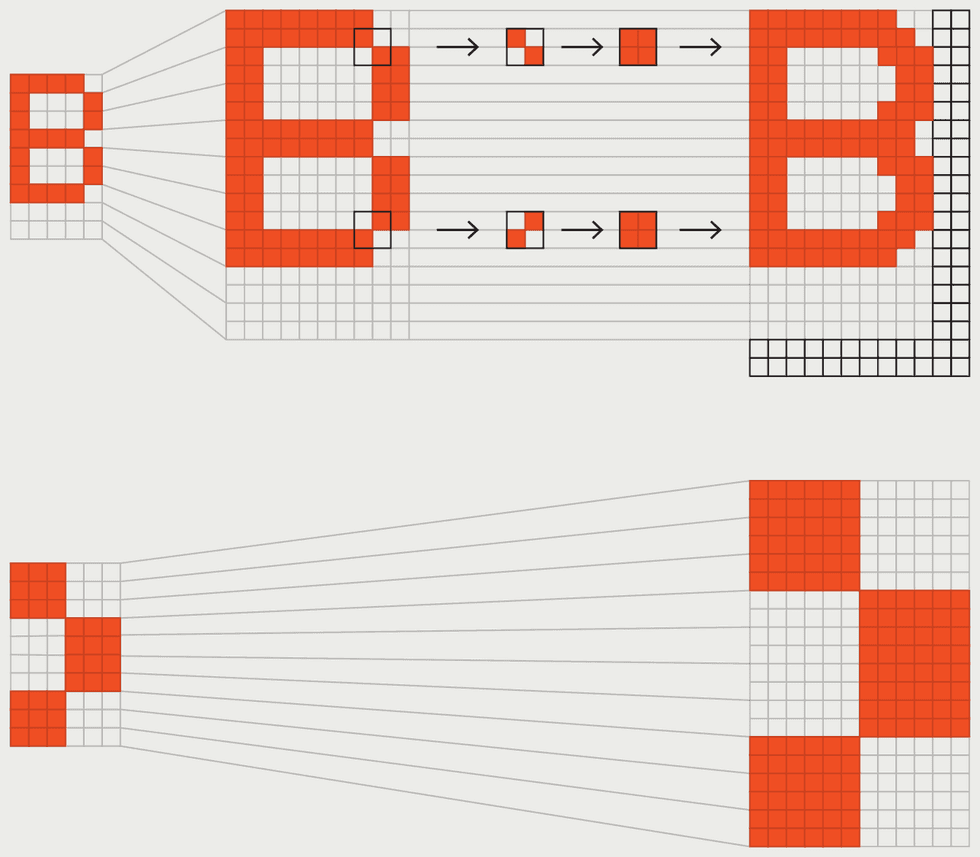
Teletext is composed of characters that can be one of eight colors. Control codes in the character stream select colors and can also produce effects like flashing text and double-height characters. The text’s legibility was better than most computers could manage at the time, thanks to the SAA5050 character-generator chip at the heart of teletext. Although characters are internally stored on this chip in 6-by-10-pixel cells—fewer pixels than the typical 8-by-8-pixel cell used in 1980s home computers—the SAA5050 interpolates additional pixels for alphanumeric characters on the fly, making the effective resolution 10 by 18 pixels. The trade-off is very low-resolution graphics, comprising characters that use a 2-by-3 set of blocky pixels.
Teletext screens use a 40-by-24-character grid. This means that a kilobyte of memory can store a full page of multicolor text, half the memory required for a similar amount of text on, for example, the Commodore 64. The BBC Microcomputer took advantage of this by putting an SAA5050 on its motherboard, which could be accessed in one of the computer’s graphics modes. Despite the crude graphics, some educational games used this mode, most notably Granny’s Garden, which filled the same cultural niche among British schoolchildren that The Oregon Trail did for their U.S. counterparts.
By the 2010s, most teletext services had ceased broadcasting. But teletext is still remembered fondly by many, and enthusiasts are keeping it alive, recovering and archiving old content, running internet-based services with current newsfeeds, and developing systems that make it possible to create and display teletext with modern TVs.
Putting Teletext Back on the Air
I wanted to do something a little different. Inspired by how the BBC Micro co-opted teletext for its own purposes, I thought it might make a great radio protocol. In particular I thought it could be a digital counterpart to slow-scan television (SSTV).
SSTV is an analog method of transmitting pictures, typically including banners with ham-radio call signs and other messages. SSTV is fun, but, true to its name, it’s slow—the most popular protocols take a little under 2 minutes to send an image—and it can be tricky to get a complete picture with legible text. For that reason, SSTV images are often broadcast multiple times.
Teletext is still remembered fondly by many.
I decided to send the teletext using the AX.25 protocol, which encodes ones and zeros as audible tones. For VHF and UHF transmissions at a rate of 1,200 baud, it would take 11 seconds to send one teletext screen. Over HF bands, AX.25 data is normally sent at 300 baud, which would result in a still-acceptable 44 seconds per screen. When a teletext page is sent repeatedly, any missed or corrupted rows are filled in with new ones. So in a little over 2 minutes, I could send a screen three times over HF, and the receiver would automatically combine the data. I also wanted to build the system in Python for portability, with an editor for creating pages, an AX.25 encoder and decoder, and a monitor for displaying received images.
The reason why I hadn’t done this before was because it requires digesting the details of the AX.25 standard and teletext’s official spec, and then translating them into a suite of software, which I never seemed to have the time to do. So I tried an experiment within an experiment, and turned to vibe coding.
Despite the popularity of vibe coding with developers, I have reservations. Even if concerns about AI slop, the environment, and memory hoarding were not on the table, I would still worry about the reliance on centralized systems that vibe coding brings. The whole point of a DIY project is to, well, do it yourself. A DIY project lets you craft things for your own purposes, not just operate within someone else’s profit margins and policies.
Still, criticizing a technology from afar isn’t ideal, so I directed Anthropic’s Claude toward the AX.25 and teletext specs and told it what I wanted. After about 250,000 to 300,000 tokens and several nights of back and forth about bugs and features, I had the complete system running without writing a single line of code. Being honest with myself, I doubt this system—which I’m calling Spectel—would ever have come about without vibe coding.
But I didn’t learn anything new about how teletext works, and only a little bit more about AX.25. Updates are contingent on my paying Anthropic’s fees. So I remain deeply ambivalent about vibe coding. And one final test remains in any case: trying Spectel out on HF bands. Of course, that means I’ll need willing partners out in the ether. So if you’re a ham who’d like to help out, let me know in the comments below!
From Your Site Articles
Related Articles Around the Web